
The 100% free Scrivener alternative.
Every tool, on your Mac or PC. No account, no trial.
Studio is a writing app for books, built with thousands of writers over the past two years. On the desktop, everything is free: manuscripts, outlines, a story bible wiki, index cards, a whiteboard-style grid and a scratch pad. It works offline and keeps your library on your computer. The only thing we charge for is sync.
macOS 11 or later · Windows 10 or later · Also on the web, iPhone, iPad and Android
See Studio in ten minutes
Nick from the BYOK team walks through a novel in progress, from the first chapter to the export.
In the video
Is there a free alternative to Scrivener?
Yes. Studio is free on Mac and Windows, with every tool included. You get a binder-like project drawer, chapters you can read and export as one manuscript, an outliner, index cards, a story bible wiki and a mind-mapping grid, with no account to create and no trial that runs out. It works offline, and your library stays on your computer.
Other free options include Manuskript, an open-source desktop app, bibisco’s Community Edition and Reedsy Studio, which runs in the browser. Studio’s difference is how it feels: a calm, modern app that shows you only what you’re using, keeps the depth there for when you go looking, and is in active development, with regular updates.
If you write on one computer, Studio costs nothing. If you want your library everywhere, the Premium tier, which includes sync, is $6.99 a month on the yearly plan.
What’s free, and what isn’t
Free where you write the book. Paid only if you want it everywhere.
Studio for Mac and Windows
Free
Every tool, on as many computers as you like. No account, no trial and no internet needed. Your library lives on your computer.
DownloadStudio on the web and mobile
Free
Text files and the Scratch Pad, with cloud saving and version history, in your browser and in the iPhone, iPad and Android apps.
Start in your browserStudio Premium
$6.99a month, billed yearly
Sync. Your whole library in step across the desktop app, the web, your phone and tablet, and your BYOK, with every tool on the web and mobile. Or $9.99 month to month. Free for 14 days.
Compare plansPaid or not, everyone gets every update the day it ships. There’s no Studio 2 to buy, and the desktop app updates itself.
What it costs to write on each device
| Where you write | Studio | Scrivener |
|---|---|---|
| One Mac or one Windows PC | Free | $59.99 |
| A Mac and a Windows PC | Free | $95.98 for both licenses |
| Add an iPhone or iPad | Premium: $6.99 a month, billed yearly | +$23.99, synced through Dropbox |
| Android | Premium: $6.99 a month, billed yearly | Not available |
| A browser on any computer | Free for text files; every tool with Premium | Not available |
| Major new versions | Included | Paid upgrades at a discount, as with Scrivener 3 |
Why writers look for a Scrivener alternative
It’s a powerful app. These are the complaints that come up most.
Scrivener has earned its fans: the binder, the corkboard and a Compile that can produce almost any format. But the same frustrations come up again and again.
The learning curve
Reviewers routinely suggest a course or a cheat sheet before you start your book.
In Studio: There’s nothing to set up. Open a file and write; the rest opens up as you go looking for it.
A crowded interface
Panels, inspectors and toolbars compete with your words for space.
In Studio: Studio shows the tool you’re using, not every option at once, and focus mode hides even that.
Compile
Getting a manuscript out in the right shape is one of the most common frustrations.
In Studio: Exporting a manuscript is one window: Word, PDF, Markdown or plain text, plus the font.
A license per platform
Mac, Windows and iOS are separate purchases, and the iPad syncs through Dropbox.
In Studio: One app everywhere, free on the desktop, with sync built into Premium.
No Android
There’s no Scrivener for Android, Chromebook or Linux.
In Studio: Studio runs on Android and in any modern browser, as well as Mac, Windows, iPhone and iPad.
Slow to change
Major versions come years apart, and Scrivener 3 reached Windows more than three years after the Mac.
In Studio: Studio is in active development and updated regularly, on Mac and Windows the same day.
Where everything is in Studio
The ideas you know, without the setup.
| In Scrivener | In Studio |
|---|---|
| Binder | Project drawer: folders, tags, colors, favorites and search |
| Corkboard and index cards | Card stacks, as a board or in columns |
| Outliner | Outline, with notes, colors and live word counts |
| Scrivenings | Manuscript: your chapter files read as one document |
| Compile | Manuscript export to Word, PDF, Markdown or plain text |
| Snapshots | Version history for chapters, outlines, wikis, cards and grids |
| Research folder | Wiki, plus links to files, wiki entries and web pages |
| Split editor | Two files side by side, with a divider you drag |
| Composition mode | Focus mode and fullscreen |
| Labels and status | Tags and color markers |
| Project targets | A session word count goal and a timer |
| Scapple (sold separately) | The grid, included |
| One Draft folder per project | As many manuscripts per project as you like |
A few Scrivener features have no counterpart in Studio. They’re listed further down.
Inside Studio: everything you need to write a book
Calm on the surface, deep underneath.
Studio is built around one idea: you shouldn’t have to learn a program before you can write in it. If all you want is to open a file and write a chapter, that’s all you’ll see. When you want more, it’s there. Here’s what’s inside, in the order the video shows it.
This is an overview. In-depth support documentation for every part of Studio is in the works, and we plan to release it soon.
One drawer for the whole project
A project can be a novel, a series, a journal or a stack of essays, and you can have as many as you like. Everything for it lives in the drawer, like the drawer of a writing desk: chapters, notes, plans and research, in folders you can color, tag, favorite, sort and search.
Open a project and you land on a dashboard you arrange yourself, with Continue writing, recent files, your tasks and a note to tomorrow-you. Or skip it and land in the drawer.
An editor made for long sessions
This is where you’ll spend most of your time, so it’s clean, and it stays fast even when a file passes 100,000 words. Each chapter can be its own file, with the formatting you actually use. If you like Markdown, type it and it turns into formatting.
- Select a passage to comment on it, link it to another file or wiki entry, or send it to the scratch pad
- Comments sit in the margin, anchored to the words, and can be resolved
- Find and replace, spell check and autosave
- Come back tomorrow and your cursor is right where you left it
Manuscripts: read the whole book as one
Most writers don’t write a book in one giant file. In Studio, a manuscript pulls your chapter files together into one scrolling document, much like Scrivenings. Scroll the whole book, drag chapters into a new order, color-code them, give each a one-line description and edit right there. A navigator down the side shows every act and chapter at a glance.
Compile, without the compile
When you’re ready to share it, exporting is one window: Word, PDF, Markdown or plain text, with chapter names and separators if you want them. Keep your writing font, or pick Times New Roman, Arial or Courier New for submissions.
You can keep as many manuscripts as you like in one project, too: one per draft, a sequel, a short-story cut, each with its own order.
Outlines that turn into chapters
Some writers plan every scene and some plan nothing; Studio is happy either way. The outline is made for typing: Enter for a new row, Tab to tuck it under the one above, Alt and the arrow keys to move it. Rows hold notes and colors, and a row linked to a chapter shows its word count, so your plan shows what’s written and what isn’t. Click Start writing on a planned row and Studio creates the chapter, names it and links it.
Your outline and your book, in one order
Tell a manuscript to follow an outline and they move together: drag a chapter in either one and the other follows. Acts become dividers, and chapters you haven’t written yet wait in their place, marked Not written yet, with your notes underneath. Already have a manuscript? One click builds an outline from it.
Card stacks: a corkboard for scenes and ideas
Cards are for thinking in pieces: scenes, beats, characters, stray ideas. Group them into sections, color them, shuffle them around, or flip to columns if that’s how your brain works. A card can link to a file or a web page, and a whole stack exports to a spreadsheet.
The grid: mind maps, timelines and plot boards
The grid is a giant whiteboard. Put tiles anywhere, make them any size, write in them and draw arrows between them, then zoom out to see the whole story. Group tiles so they move together and add sticky-note labels.
Writers use it for mind maps, timelines, family trees and plot boards, and some use one as a dashboard for the whole project.
The wiki: a story bible that knows your book
Every long story needs a story bible: who’s who, what’s where, and what color Mara’s eyes were back in chapter three. In Studio, that’s the wiki, and it’s just as handy for research if you don’t write fiction.
Each character, place or thing gets a page with a picture, quick facts and the other names it goes by. Decide once what a category’s pages should hold, say Age, Home, Wants and Fears for every character, and every entry gets those fields. Show a category as a list, a gallery or a table.
It reads your chapters
Type [[ in any chapter to link an entry, or create one on the spot, and hover any link for a preview. When a name from your wiki appears in your writing, it gets a soft underline without changing your text, and every page lists each chapter that mentions it.
Make the writing space yours
Focus mode hides everything but your words. Choose light or dark or follow your system, pick from more than two dozen color themes, or turn on high contrast. Eight writing fonts are chosen for long sessions, among them Literata, Crimson Pro, Lora and Atkinson Hyperlegible, with your own line spacing and margins, and your font carries into Word and PDF exports.
Want your notes beside your chapter? Open two files side by side and drag the divider wherever you like.
And a typewriter, just for fun
Open any text file on a 3D typewriter. The bell rings near the end of the line, there’s correction tape for your mistakes, and you can have rain in the background. It’s the same file underneath, so everything you type is saved.
A scratch pad for ideas that arrive at the wrong time
Keyboard first, if you like
Your words are safe, and they’re yours
This is a writing app, after all.
Version history
On your computer
One-file backups
Never locked in
No AI
Updates included
How to move your book from Scrivener to Studio
A few minutes, and nothing to retype.
Export your chapters from Scrivener
Select the chapters in the binder, choose File > Export > Files, and save them as Word (.docx), RTF or plain text. Turn on numbering in the Options tab so the files keep their order.
Download Studio and make a project
Install Studio for Mac or Windows. There’s no account to create; it’s ready when it opens.
Drop the files in
Select all the exported files and drop them into the project’s drawer. Studio imports Word, RTF, Markdown and text files, and keeps numbered files in order.
Add them to a manuscript
Create a manuscript, choose Add Existing Files and select your chapters. Your book reads as one document again.
Rebuild the plan, if you like
From the manuscript, make a new outline in one click, and carry on writing.
Studio doesn’t open .scriv projects directly, so your Scrivener project stays exactly as it was. Word files written in Microsoft Word or Google Docs come in the same way.
Where Scrivener is still the better choice
We make Studio, so we’re biased. Here’s what it doesn’t do… yet.
Ebook and print formatting
Scrivener’s Compile can produce EPUB, Kindle and print-ready files. Studio exports Word, PDF, Markdown and plain text, so for an ebook you’d format a Word export in a tool like Vellum, Atticus or Kindle Create.
Screenwriting
Scrivener has a scriptwriting mode for screenplays and stage plays. Studio doesn’t.
Footnotes and endnotes
Scrivener handles them and carries them through Compile. Studio has comments, but no footnotes.
Research files inside the project
Scrivener stores PDFs and saved web pages in its research folder. Studio links to web pages and files instead of keeping copies.
Deep metadata
Collections, saved searches, custom metadata fields and writing-history statistics have no Studio equivalent. Studio uses tags, colors, descriptions and a session word count goal.
A one-time price for sync
If you want your library on every device, Studio Premium is a subscription, while Scrivener’s apps are one-time purchases.
If those matter most to you, Scrivener is a great app. If you want a calmer, modern place to write a book that costs nothing on your computer, try Studio.
Other Scrivener alternatives worth knowing
If Studio isn’t the one, one of these may be.
| App | Price | Runs on | Offline | Good for |
|---|---|---|---|---|
| Studio | Free on Mac and Windows; sync with Premium, $6.99 a month billed yearly | Mac, Windows, web, iPhone, iPad, Android | Yes, on desktop | Scrivener-style organization in a calm, modern app that costs nothing on your computer |
| Scrivener | $59.99 per desktop platform, one-time; $23.99 for iPhone and iPad | Mac, Windows, iPhone, iPad | Yes | Power users who want deep customization and Compile to EPUB and print |
| Atticus | $147, one-time | In the browser, installable on Windows, Mac, Linux and Chromebook | Limited | Self-publishers who want writing and ebook and print formatting in one tool |
| Dabble | From $15 a month billed yearly, or $699 for life | Any device, browser-based | Yes | Plotters who want a cloud-first app with a plot grid and co-writing |
| Reedsy Studio | Free; add-ons from $4.99 a month | Browser only | No | Free EPUB and print-ready exports and collaboration in the browser |
| Ulysses | $5.99 a month or $39.99 a year | Mac, iPhone, iPad | Yes | Apple users who want a minimal, Markdown-based writing app |
| Manuskript | Free, open source | Windows, Mac, Linux | Yes | A free, open-source outliner for novels, if a dated look doesn’t bother you |
About this comparison: it was written by the team that builds Studio and last updated on October 25, 2026. We’ve tried to be fair to every app here, including Scrivener.
Book writing software for every kind of writer
Not only for people leaving Scrivener.
Novelists
Manuscripts, outlines and a story bible in one place, with as many manuscripts as you need for drafts, sequels and spin-offs.
First-time authors
Start with one text file and nothing else. The rest of Studio is there when you want it, and nothing has to be set up first.
Short story writers
Keep every story in one library, each as its own file or manuscript, and find any of them with search.
Nonfiction and memoir
Use the wiki for research and sources, the outline for chapters, and export to Word for your editor.
Journals, essays and newsletters
A project for each, with tags and a dashboard that picks up where you left off.
BYOK owners
Studio is home base for the BYOK, our distraction-free writing device: draft on the BYOK, then shape the book in Studio.
Meet the BYOKWriting a book in Studio, start to finish
- Step 1
Catch the ideas
Jot them in the scratch pad, or lay them out on cards.
- Step 2
Build the story bible
Characters, places and research go in the wiki.
- Step 3
Outline the book
Acts and chapters, with notes under each one.
- Step 4
Write the chapters
Click Start writing on each one and draft in focus mode.
- Step 5
Revise as a whole
Read it all as a manuscript, move chapters, leave comments.
- Step 6
Share it
Export to Word or PDF for editors and beta readers.
One Studio on every device
Mac, Windows, the web, iPhone, iPad and Android. Search for BYOK Studio.
Mac and Windows
The free desktop app, with every tool, offline. macOS 11 or later on Apple silicon or Intel, and Windows 10 or later.
DownloadIn your browser
Nothing to install. Sign in at app.byok.io on any computer, Chromebooks and Linux included.
Start writingiPhone, iPad and Android
Rebuilt for touch rather than squeezed down, with every editor, a reference panel beside the file you’re writing, and search across all your projects.
App StoreGoogle PlayStudio Premium keeps them in step. Change a file on one device and it updates on the others; changes made offline on the desktop catch up when you reconnect, and if two edits truly conflict, Studio shows you both and lets you choose. The web and mobile apps need a connection.
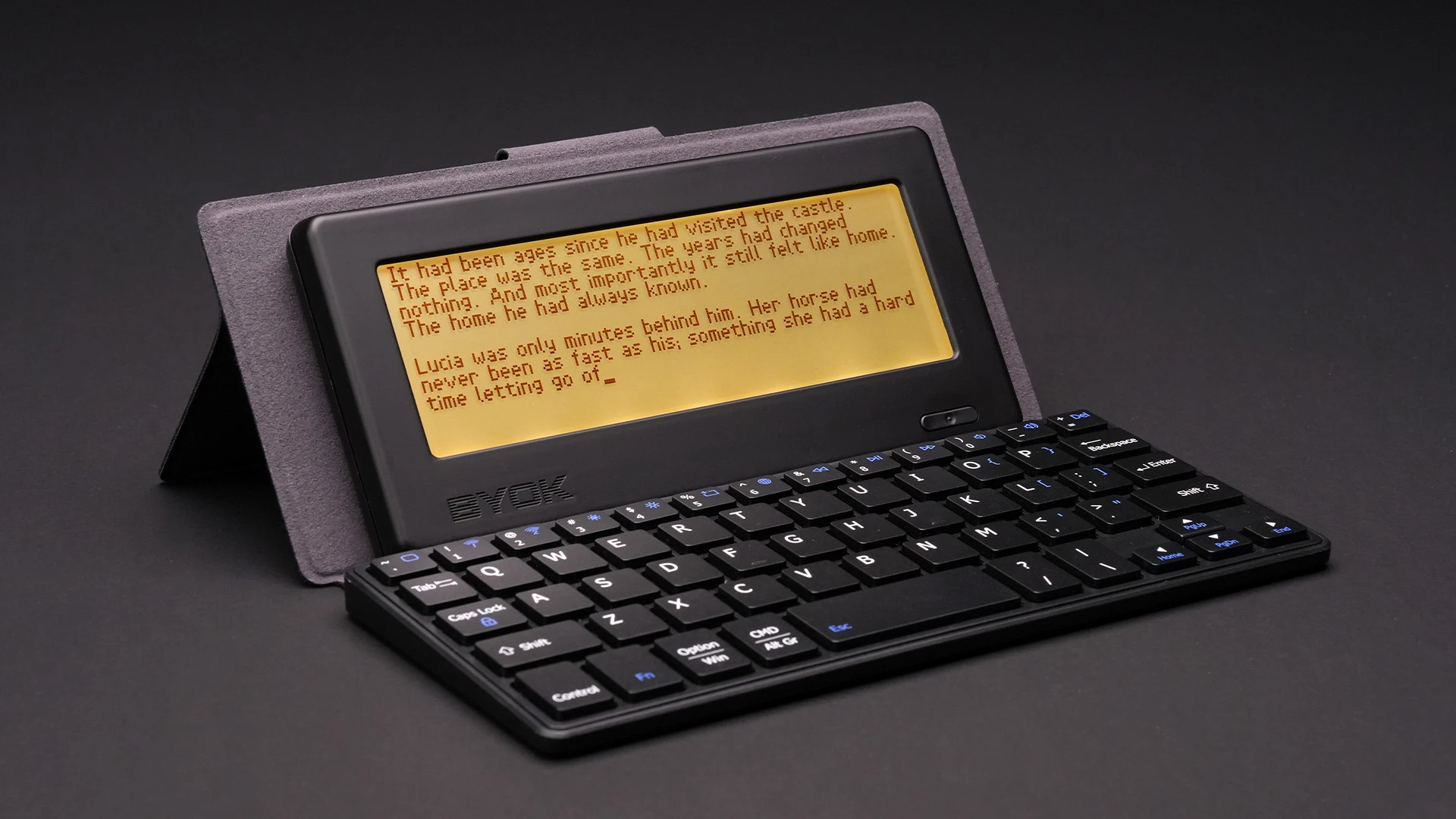
Meet the BYOK, Studio’s writing companion
The BYOK is a small, distraction-free writing device. Pair it with any keyboard you like, wired or wireless, and draft with nothing else on the screen: no apps, no notifications, no browser.
When you’re done, your writing comes into Studio over Wi-Fi, or by USB or microSD card in the desktop app, ready to organize and revise. You don’t need a BYOK to use Studio, but the two are made to work together.
Two years in the making, and just getting started
We started building Studio in October 2024, and writers have used it the whole way, telling us what works and what doesn’t. Most of what’s in it came from those conversations. The suggestion box and bug report are built into the app. Studio is in active development, and every release is written up in the public update log.
“Studio gives you almost a complete Scrivener-type way of planning, plotting, outlining — everything you could want to do with a book.”
“So far this app is excellent. The only thing I am not happy about is the fact I just paid for Scrivener when this looks to be superior.”
Questions writers ask
Is Studio really free?
Yes, on Mac and Windows. Every tool in the desktop app is free, on as many computers as you like, with no account and no trial. The only paid part is Studio Premium, which adds sync across your devices and every tool on the web and mobile.
Is there a free version of Scrivener?
No. Scrivener has a 30-day free trial, counted in days you actually use it, and then costs $59.99 for Mac or Windows, sold separately, plus $23.99 for iPhone and iPad. There’s no Android version.
How much does Studio Premium cost?
$6.99 a month on the yearly plan, or $9.99 month to month, with a 14-day free trial. You only need it if you want your library in sync across devices, or every tool on the web and mobile.
Can I import my Scrivener project into Studio?
Your writing, yes; the .scriv project file itself, no. In Scrivener, choose File > Export > Files and save your chapters as Word, RTF or plain-text files with numbering turned on. Then select them all, drop them into Studio and add them to a manuscript. Numbered files stay in order.
Does Studio work offline?
The desktop app works completely offline, and your library lives on your computer. The web app and the mobile apps need an internet connection.
Does Studio have a corkboard and an outliner like Scrivener?
Yes. Card stacks are Studio’s corkboard, as a board of index cards or in columns, and the outline handles planning, with notes, colors and live word counts. There’s also a grid for mind maps and plot boards, which Scrivener users usually buy Scapple for.
Can Studio export to EPUB or Kindle?
No. Manuscripts export to Word, PDF, Markdown and plain text. Many authors format a Word export for ebook and print with a dedicated tool such as Vellum, Atticus or Kindle Create.
Is Studio available on iPad and Android?
Yes. Search for BYOK Studio on the App Store and Google Play. The mobile apps are free for text files and the Scratch Pad; Premium adds every tool and keeps them in sync with your computer.
Does Studio use AI?
No. There are no AI features in Studio, by design. Your words are yours.
Is Studio good for writing a first book?
Yes. You can start with a single text file and ignore everything else. Nothing has to be set up before you write.
Is there documentation for Studio?
Yes, and more is coming. The Studio guide on byok.io walks through the newest features step by step, and in-depth support documentation for every part of Studio, long requested by writers, is in the works and planned for release soon.
Who makes Studio?
BYOK, the team behind the BYOK distraction-free writing device. Studio has been in development since October 2024, and the update log on byok.io lists every release.

Write your book in Studio.
Free on Mac and Windows. No account, no trial. Sync with Premium whenever you want it.
Prefer the browser? Start writing at app.byok.io